📖 App-Cleaner Buddy Manual
How App-Cleaner Buddy works, step by step
What App-Cleaner Buddy does
App-Cleaner Buddy shows where your phone's storage goes, using Android's own figures, and helps you find the apps worth removing: apps you haven't opened for months, apps that take a lot of space for the little you use them, and apps that keep getting bigger.
It never deletes anything itself. Uninstall, Archive and App info open Android's own screens, and you confirm there. It has no ads, no pop-up warnings and no "junk" or "boost" buttons: every number is a reading from Android.
To keep this manual, tap 📤 Share the manual at the top of the Manual tab: it makes a PDF to save, email or print.
Why it asks for Usage access
Android only tells an app how big other apps are, when they were last used and for how long, if you switch on Usage access for it. Tap Turn on in the card at the top, find App-Cleaner Buddy in the list and switch it on.
- Usage access is only used to read app sizes and app use, on this phone. Nothing is sent anywhere.
- Without it, App-Cleaner Buddy can only show total and free space. The demo still works.
Overview tab
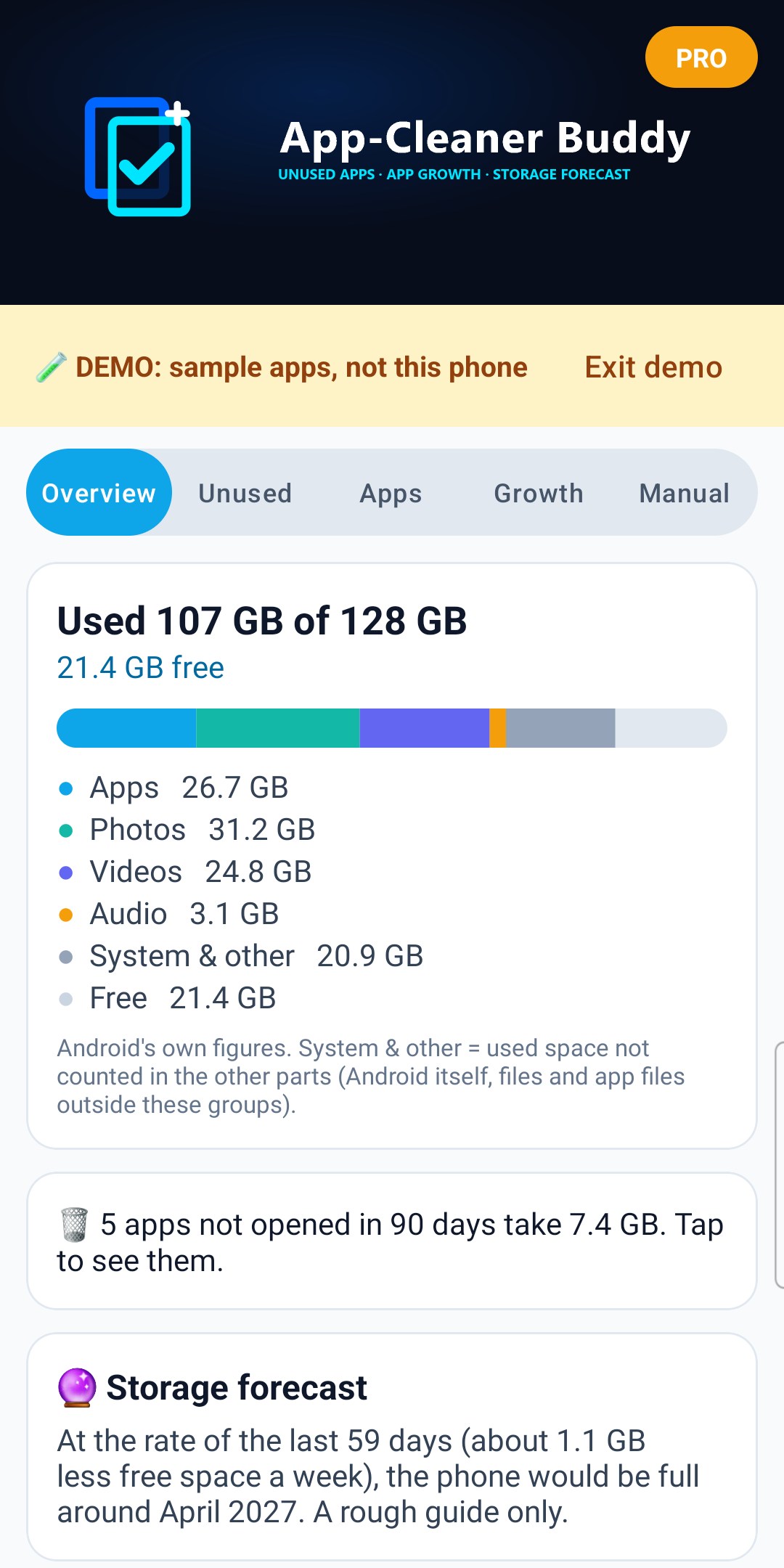
- Used and free space, and a coloured bar showing Apps, Photos, Videos, Audio, System & other, and Free.
- System & other is the used space not counted in the other parts: Android itself, downloads and other files.
- A shortcut to your unused apps, with how much space they take.
- 🎯 I need space for… (Pro) and 🔮 Storage forecast (Pro), see below.
- ✅ How much you've freed so far, see below.
Sizes use 1 GB = 1,000 MB. Some phones count 1 GB = 1,024 MB, so a 128 GB phone shows as 137 GB here; App-Cleaner Buddy says so under the free space when that's the case.
Unused tab
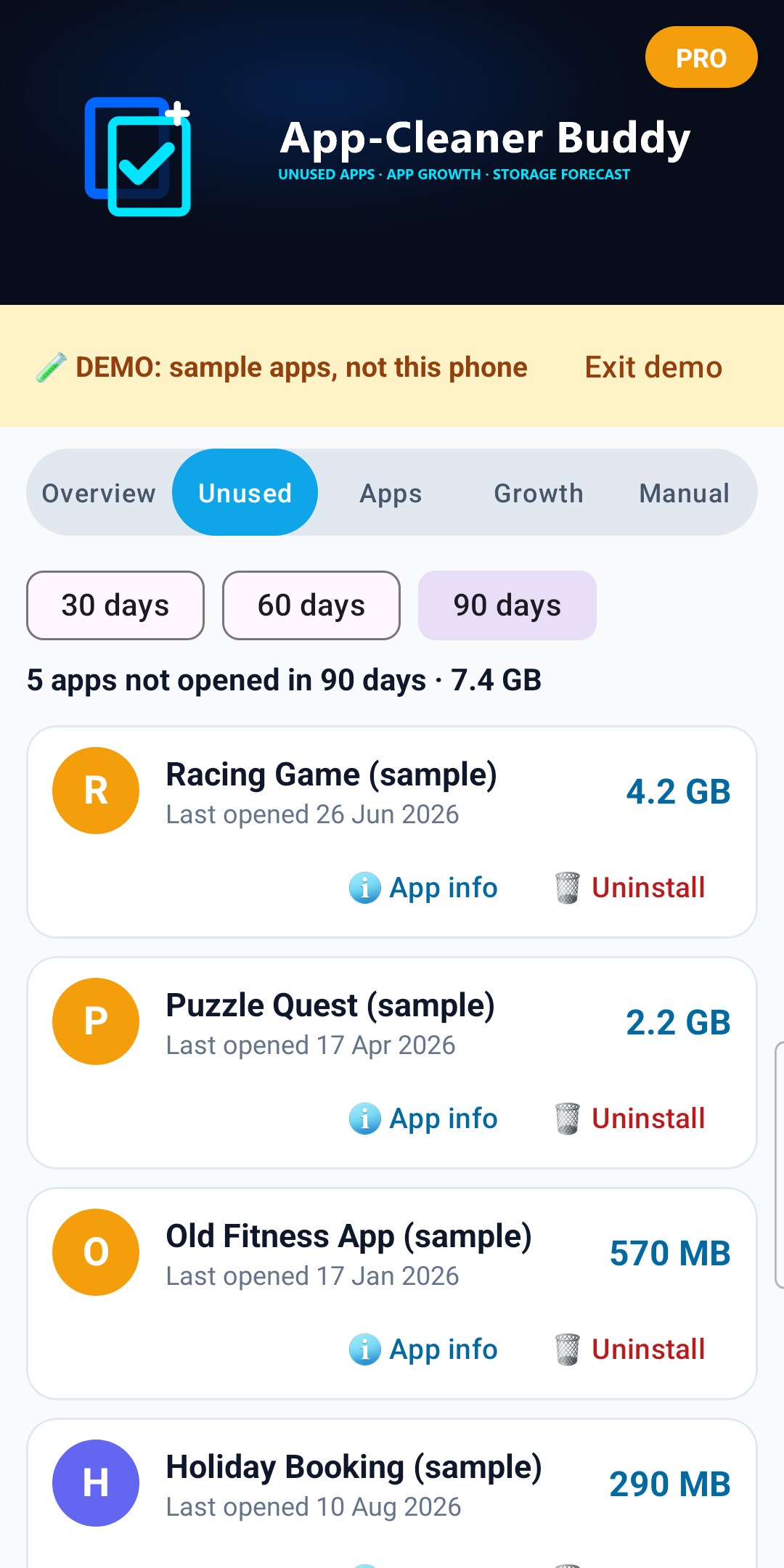
Apps you haven't opened in 30, 60 or 90 days (tap to choose), biggest first, with when Android last recorded you using each one, and how long you used it in the last 30 days.
- "No use recorded by Android" means Android has no record of the app being used in the time it keeps (often up to about 2 years). The install date is shown instead.
- Apps that came with the phone aren't listed here, because they can't be uninstalled.
- 🗑️ Uninstall opens Android's own "Uninstall this app?" screen. You confirm there.
- 📦 Archive (Android 15 and newer), see below.
- ℹ️ App info opens Android's App info screen for that app.
- Tick apps and tap 🧹 Remove to remove several in one go, see below.
Apps tab
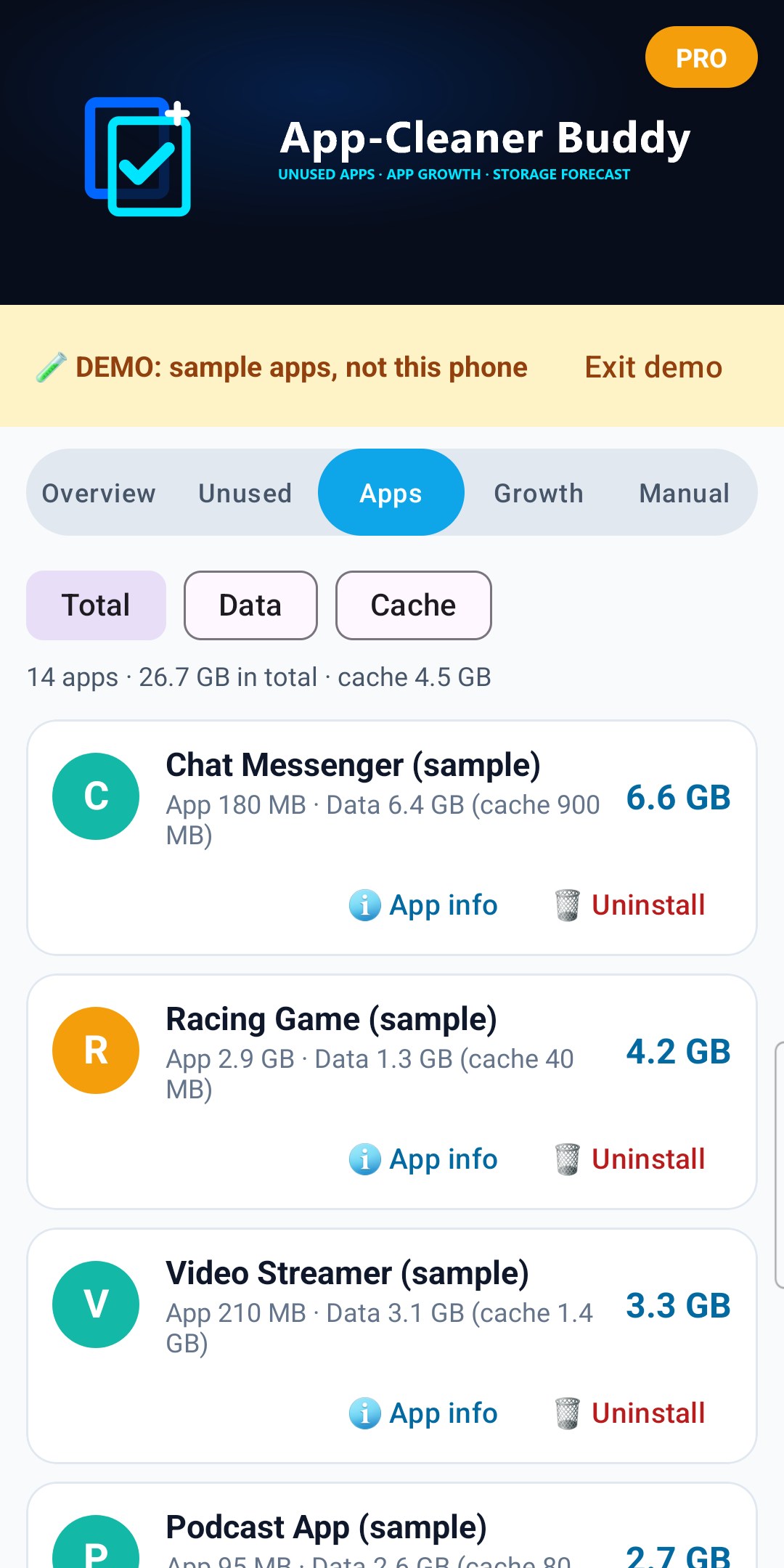
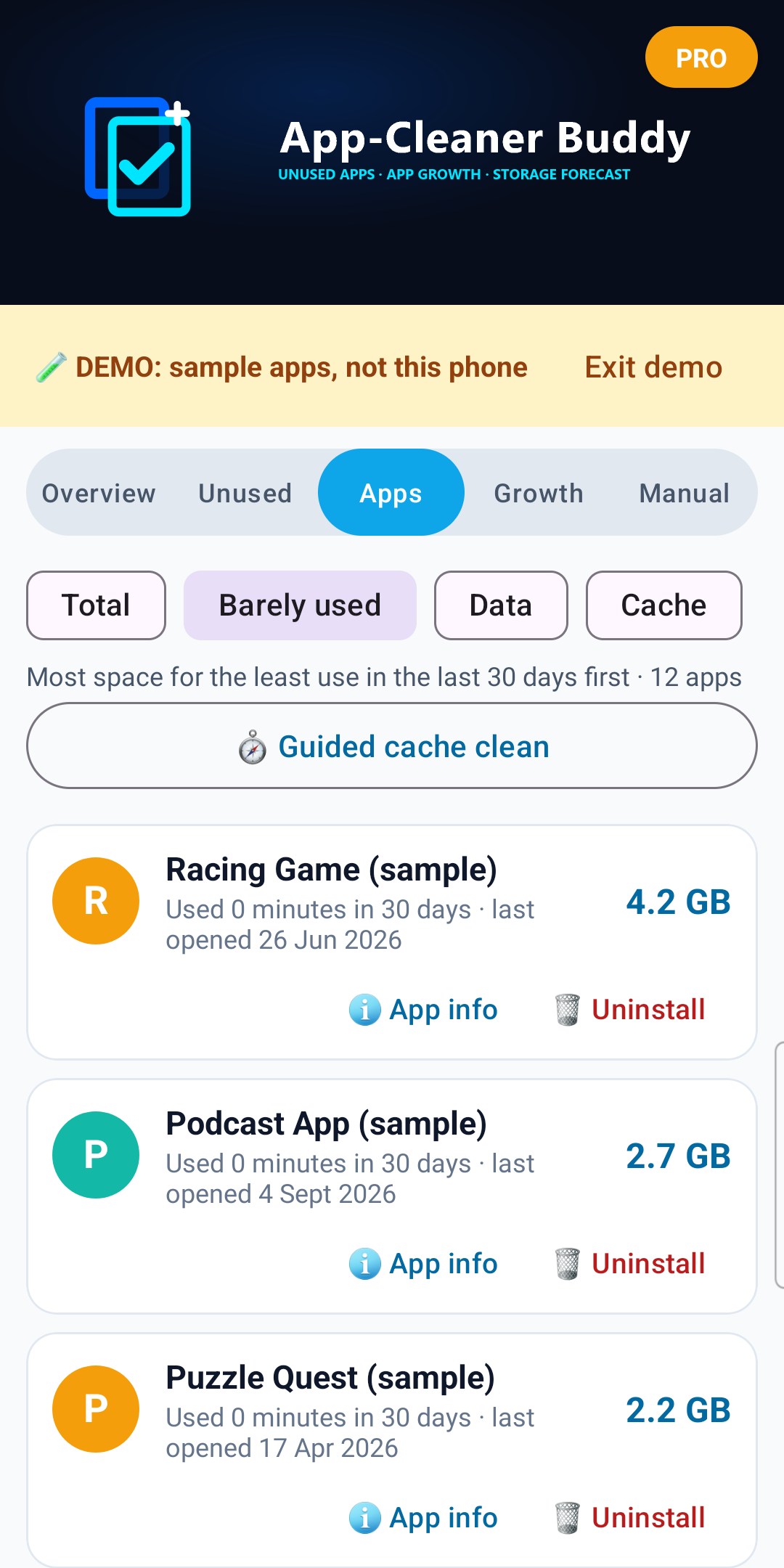
Every app in your app drawer. Sort by Total, Barely used, Data or Cache.
- The Apps figure on the Overview tab is bigger: it also counts Android's own apps and services, which aren't in the app drawer.
- App = the app itself. Data = everything it has saved, including its cache. Cache = files it can download or make again.
- Barely used: the apps taking the most space for the least use in the last 30 days come first, with how long you used each one. Apps that came with the phone are left out.
- To clear an app's cache, tap ℹ️ App info, then Storage, then Clear cache. Android only lets you do this yourself, app by app. 🧭 Guided cache clean (Pro) takes you through your biggest caches one by one.
- Apps that came with the phone show "came with the phone" and have no Uninstall button; App info can disable some of them.
- Tick apps and tap 🧹 Remove to remove several in one go, see below.
📦 Archive (Android 15 and newer)
Archive removes the app itself and its cache, but keeps its data and logins. Its icon stays on your home screen: tap it any time and Android gets the app back, as it was.
- Android shows its own confirmation, and does the archiving.
- Only apps from an app store that supports archiving (such as Google Play) can be archived. If Android can't, App-Cleaner Buddy says so.
- On Android 14 and older there's no Archive button: use Uninstall.
🧹 Remove several apps in one go
On the Unused or Apps tab, tick the apps you want to remove (on Unused, Select all ticks every app in the list), then tap 🧹 Remove. Android asks you about each app in turn: confirm to remove it, or tap Cancel to keep it.
- On Android 15 and newer, choose 📦 Archive (keeps each app's data and logins) or 🗑️ Uninstall (removes everything).
- Apps that came with the phone can't be ticked.
- At the end, App-Cleaner Buddy shows how many apps were removed and the space freed, measured from each app's size before and after.
✅ Freed so far
After you uninstall, archive or clear an app's storage from App-Cleaner Buddy, it measures that app's size again when you come back and adds what was freed to a running total, shown on the Overview tab. Only space measured as freed is counted.
🎯 I need space for… (Pro)
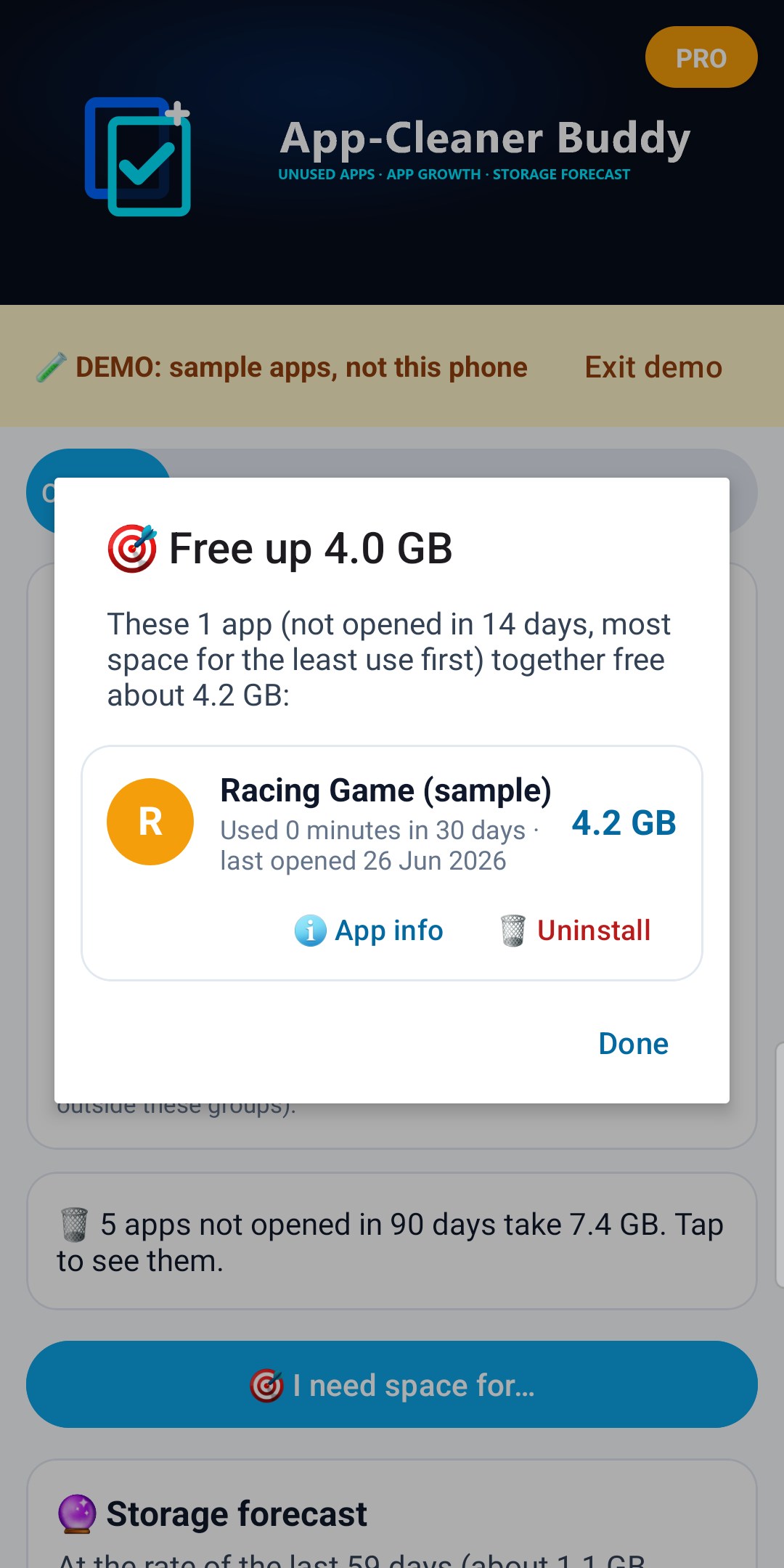
Tap 🎯 I need space for… on the Overview tab and choose how much space you need to free up (1, 2, 4, 8 or 16 GB), for example for an update or holiday videos. App-Cleaner Buddy lists the fewest apps you haven't opened in 14 days that together free it, taking the apps with the most space for the least use first. Archive or uninstall them straight from the list, or tap 🧹 Remove all to remove them in one go.
🧭 Guided cache clean (Pro)
On the Apps tab, tap 🧭 Guided cache clean. App-Cleaner Buddy takes you through the apps with the most cache (over 20 MB), one at a time:
1. Tap Open App info, then Storage, then Clear cache.
2. Come back with the Back button. App-Cleaner Buddy measures the cache again and shows what was freed, then moves on.
Skip any app, or Stop at any time. Apps make new cache as you use them, so some of it comes back over time.
📈 Growth tab (Pro)
App-Cleaner Buddy saves one storage reading a day on this phone: free space and the size of each app. From these readings:
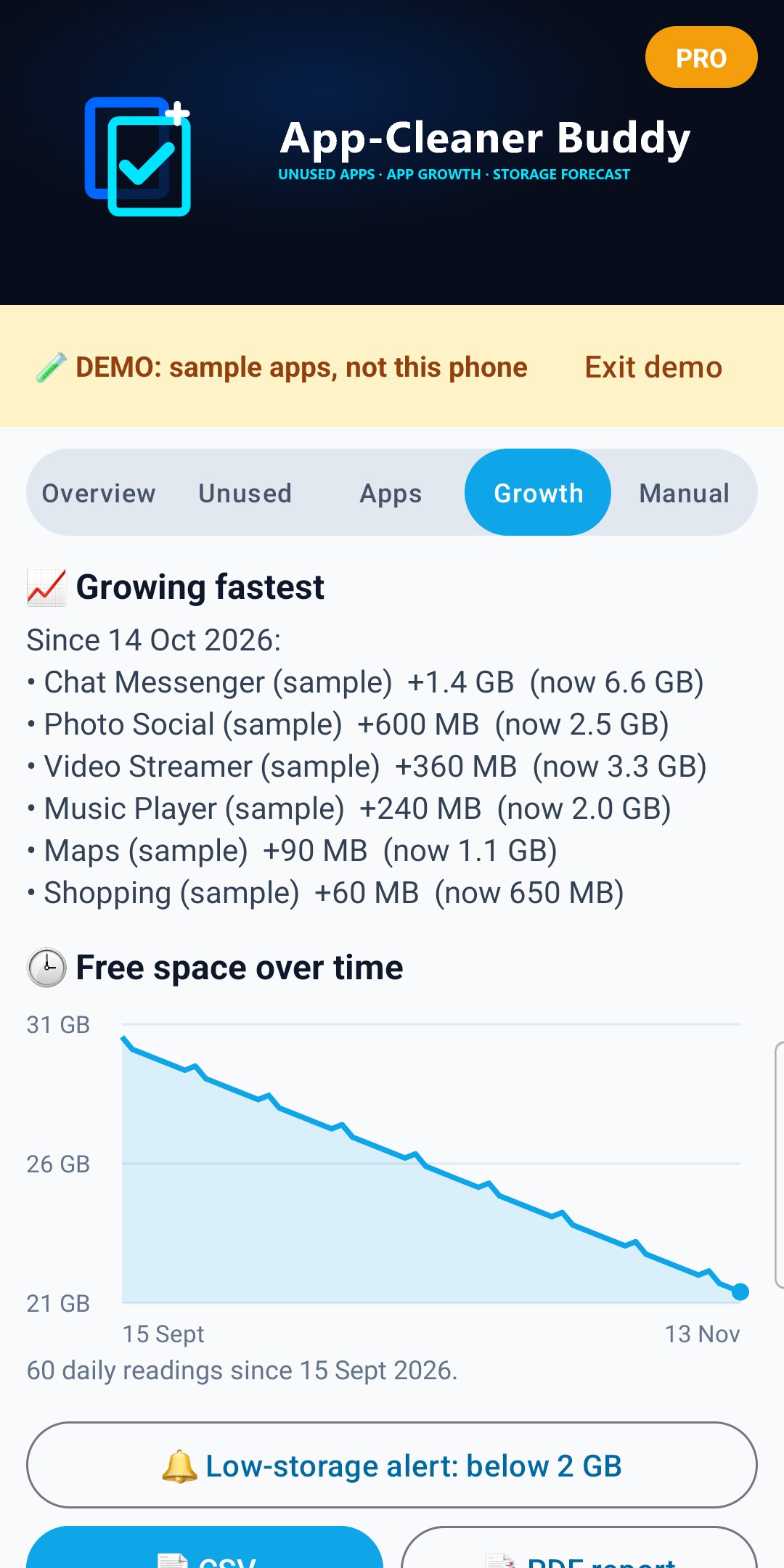
- Growing fastest: the apps that got biggest since the reading closest to 30 days ago, for example "Chat app +1.2 GB".
- 🕵️ Growing in the background: apps that grew by more than 50 MB although Android hasn't recorded you using them since then.
- Free space over time: a graph of free space.
- The first comparison appears once there are two readings at least 24 hours apart.
Android decides exactly when the daily reading runs, so some days may be missed.
🔮 Storage forecast (Pro)
From the daily readings of the last 60 days, App-Cleaner Buddy works out how fast free space is going down and when the phone would be full at that rate. It needs at least 4 readings over 7 days.
If free space isn't going down, it says so. The forecast is a rough guide: installing or deleting something big changes it.
🔔 Alerts, 📬 weekly summary and 📱 widget (Pro)
- 🔔 Low-storage alert: in the Growth tab, choose a level (1, 2, 5 or 10 GB). When the daily reading finds less free space than that, App-Cleaner Buddy sends a notification, at most once a day.
- 📬 Weekly summary: switch it on in the Growth tab. Once a week: how your free space changed and which app grew most. The first one comes once the daily readings cover a week.
- 📱 Widget: long-press your home screen, tap Widgets and add App-Cleaner Buddy. It shows free space and the forecast, and updates with the daily reading and whenever you open the app.
On Android 13 and newer, allow notifications when asked.
📄 CSV and PDF report (Pro)
- CSV: every app with its sizes, use in the last 30 days, last use and install date, then the daily readings, for Excel or Google Sheets. Apps that came with the phone often have no real install date from Android: the CSV says "not recorded".
- PDF report: the storage breakdown, forecast, the biggest unused apps (up to 20), the biggest apps and the apps growing fastest.
Files are only shared when you choose an app on Android's share screen.
🧪 Demo
Tap 🧪 Try the demo (the card at the top, or the Manual tab) to see every screen with sample apps and 60 days of sample readings. A yellow strip says DEMO: sample apps, not this phone, and exports made in the demo say DEMO too. In the demo you can try Growth, the forecast, I need space for…, CSV and the PDF report for free. Tap Exit demo to go back to your phone.
Once you've bought Pro, 🧪 Try the demo is no longer shown on the card at the top or in the Manual tab.
What it can't do
- Delete photos, videos or files: Google Play only lets gallery and file manager apps read all your photos and files.
- Clear other apps' cache by itself: Android only lets you do that in each app's App info.
- "Boost" memory or speed: Android manages memory itself.
For photos and downloads, use your phone's Gallery or Files app.
⭐ Pro
Pro is one payment for life. No subscription.
- 🎯 I need space for…
- 🧭 Guided cache clean
- 📈 App growth and 🕵️ growing in the background
- 🔮 Storage forecast
- 🔔 Low-storage alert and 📬 weekly summary
- 📱 Home-screen widget
- 🕒 Free-space history graph
- 📄 CSV and PDF report
Free always includes the storage breakdown, unused apps, barely used apps, 🧹 Remove several apps in one go, Archive and the freed total.
Tap GO PRO at the top. Already bought it, or on a new phone with the same Google account? Tap Restore purchase.
Your privacy
- App sizes, app use and the daily readings are kept on this phone only. They are not backed up and are never sent anywhere.
- No account and no ads. Pro is bought through Google Play.
- Files only leave your phone when you share a CSV or PDF yourself.
About
App-Cleaner Buddy v1.5 (Build 6)
Publisher: AppStack Studio
⚡ WHY APP-CLEANER BUDDY
App-Cleaner Buddy shows where your storage goes using Android's own figures, and finds the apps worth removing: the ones you no longer open, and the ones that keep getting bigger. No ads, no pop-up warnings and no "junk" or "boost" buttons.
| Feature |
Typical "cleaner" apps |
App-Cleaner Buddy |
| Where the numbers come from |
"Junk found" totals that come back the next day |
Android's own readings: app, data and cache for each app |
| Apps you no longer use |
Often not shown |
Not opened in 30, 60 or 90 days, biggest first, with the last date Android recorded |
| Free space but keep the app's data |
Uninstall only |
📦 Archive (Android 15+): the app is removed, its data and logins kept; one tap brings it back |
| Space for the use you get |
Size only |
Barely used: most space for the least use in the last 30 days first |
| "I need 4 GB for an update" |
You work it out |
⭐ Pro: the fewest apps to remove to free that much |
| Apps that keep getting bigger |
Not shown |
⭐ Pro: growth since about 30 days ago, from daily readings on your phone |
| When will my phone be full? |
Not shown |
⭐ Pro: forecast from your own readings, plus a low-storage alert |
| Ads and scare pop-ups |
Common |
None |
⚠️ IMPORTANT DISCLAIMER
- App-Cleaner Buddy shows the sizes and last-use dates that Android reports. Some phones count 1 GB = 1,024 MB, so totals can look different from the phone's own Settings.
- "Last opened" is only as complete as Android's usage records, which are kept for a limited time (often up to about 2 years).
- The forecast is a rough guide based on past readings; installing or deleting something big changes it.
- App-Cleaner Buddy never deletes anything itself: Uninstall, Archive, 🧹 Remove and App info open Android's own screens, where you confirm. App names and icons shown belong to their owners.
Screenshots show the app's built-in demo (sample apps, not a real phone), with Pro switched on.