📖 Scam Check Buddy Manual
Everything below is the same text as the Manual tab in the app.
What Scam Check Buddy does
Scam Check Buddy reads a message you're not sure about and lists the warning signs it finds, so you can decide before you tap a link, reply or pay. It never says a message is safe: no app can prove that. It only says what it found.
To keep this manual, tap 📤 Share the manual at the top of the Manual tab: it makes a PDF to save, email or print.
Check tab: checking a message
- Paste: copy the message in your messages, email or WhatsApp app (long-press it, then Copy), then tap 📋 Paste.
- Share: in many apps you can tap Share on a message and pick Scam Check Buddy.
- Select: select the text in any app and pick Scam check from the menu that appears (on some phones under ⋮ or "More").
- 📷 Scan a QR code: shows the web address in a QR code and checks it, without opening it. The scanner comes from Google Play services, so the app doesn't need the camera permission.
- You can also type or paste a single web address.
- The check runs on the phone straight away, with no internet.
What it looks for
In the web addresses:
- Lookalikes: an address that uses a company's name but isn't its website, for example "royalmail-redelivery.top" (also with numbers for letters, like "r0yalmail").
- A message that names a company (for example Evri, HMRC or PayPal) but links somewhere else.
- Short links (bit.ly, tinyurl.com and others) that hide where they go.
- Tricks: special letters that look like normal ones, a bare number instead of a name, or a real company name before an @ that hides the real website.
- Endings that are cheap to register and rarely used by UK companies (for example .top or .xyz). This is information, not proof.
In the message:
- Rushing you, small fees, delivery problems, refunds, account or payment problems, "new number" family messages, prizes, investment returns and unpaid tolls or fines.
- Asking you to move money to a "safe" account, to pay with gift cards, to share a code or PIN, or to allow remote access.
- Asking you to call a number.
Checking the links online
- Tap 🌐 Check the links online after a check that found links.
- The official domain register for each address is asked when the website was registered (RDAP, the public record that replaced WHOIS). Scam websites are usually days or weeks old: under 90 days is a strong warning sign, under a year a sign to be careful.
- Short links: the short-link service is asked where its link points. The app reads the answer but doesn't follow it, so the website at the end is never opened and can't see that you checked it.
- The address a short link leads to is then checked the same way as the others.
- Only the web addresses are sent, never the rest of your message.
- Free: 3 online checks a day. Pro: as many as you like.
Reading the result
- 🔴 Strong warning signs: don't tap the link, reply or pay. Contact the company using its own app, its website typed in yourself, or the number on your card.
- 🟡 Be careful: check with the company or person another way before you do anything.
- No warning signs found: that doesn't prove the message is genuine. If it asks for money, details or a code, check with the sender another way first.
- ℹ️ lines are information, for example a company's own website or how old a website is.
- 🛡️ What to do opens the Tips tab.
Tips tab
What to do if a message might be a scam (in the UK: forward scam texts to 7726, scam emails to report@phishing.gov.uk, and call 159 to reach your bank safely), and the most common scams in the UK with how to spot them.
Pro
Pro is one payment for life, with no subscription. It adds:
- ⭐ Online checks as often as you like (Free: 3 a day)
- ⭐ Every check saved on the Results tab, newest first; delete one or clear all
- ⭐ Share a result as a PDF, for example to show a relative or your bank
Everything else is free. Tap GO PRO at the top to buy or to restore a purchase on a new phone.
Privacy
- No account and no sign-in.
- The messages you check stay on this phone. With Pro, saved checks are kept on this phone only; they aren't backed up to the cloud or copied to a new phone.
- The online check sends only the web addresses: the domain name to its official register, and a short link to its short-link service.
- Scam Check Buddy can't read your texts, emails or chats by itself: it only sees what you paste, share or select.
- A PDF only leaves the phone if you share it.
About
Scam Check Buddy v1.0 (Build 1)
Publisher: AppStack Studio
🛡️ WHAT TO DO (from the Tips tab)
- Don't tap the link, reply, call the number in it or pay.
- Contact the company using its own app, its website typed in yourself, or the number on your card or bill.
- Forward a scam text to 7726 (free on UK networks) to report it.
- Forward a scam email to report@phishing.gov.uk to report it.
- A call or message that says it's your bank: hang up and call 159 to reach your bank safely.
- If you've already paid or given details, call your bank straight away and report it to the police.
⚡ WHY SCAM CHECK BUDDY
| Question | Typical scam checkers | Scam Check Buddy |
|---|
| Is this website new? | Not shown | The registration date from the official domain register |
| Where does this short link go? | Open it to find out | Asks the short-link service only: the website itself is never opened |
| Does the link match the company? | A single "safe / unsafe" verdict | Every warning sign listed, in plain words, and never "safe" |
| Reading your messages | Some ask for SMS access | No SMS access: only what you paste, share or select |
| Price | Often a subscription | Free, Pro is one payment for life (no subscription) |
⚠️ IMPORTANT DISCLAIMER
- Scam Check Buddy lists warning signs. It can't prove that a message is genuine, and a message with no warning signs can still be a scam.
- The company list covers the names scam messages use most in the UK; other names aren't recognised as lookalikes.
- Scam Check Buddy is not affiliated with any company, bank or government body it mentions.
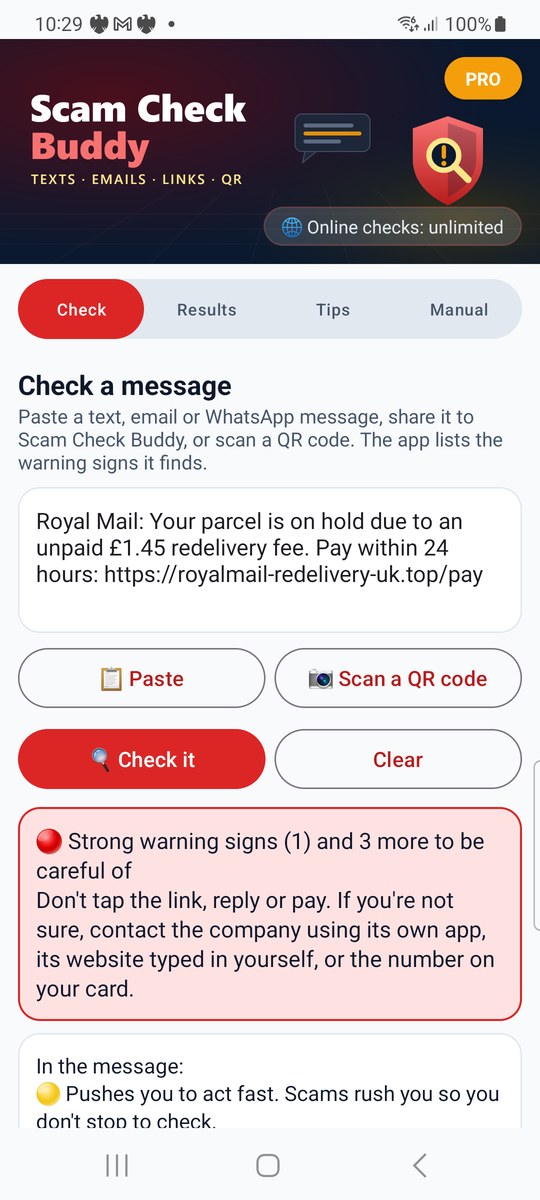
1. Check
Paste or share a message: the warning signs appear straight away.
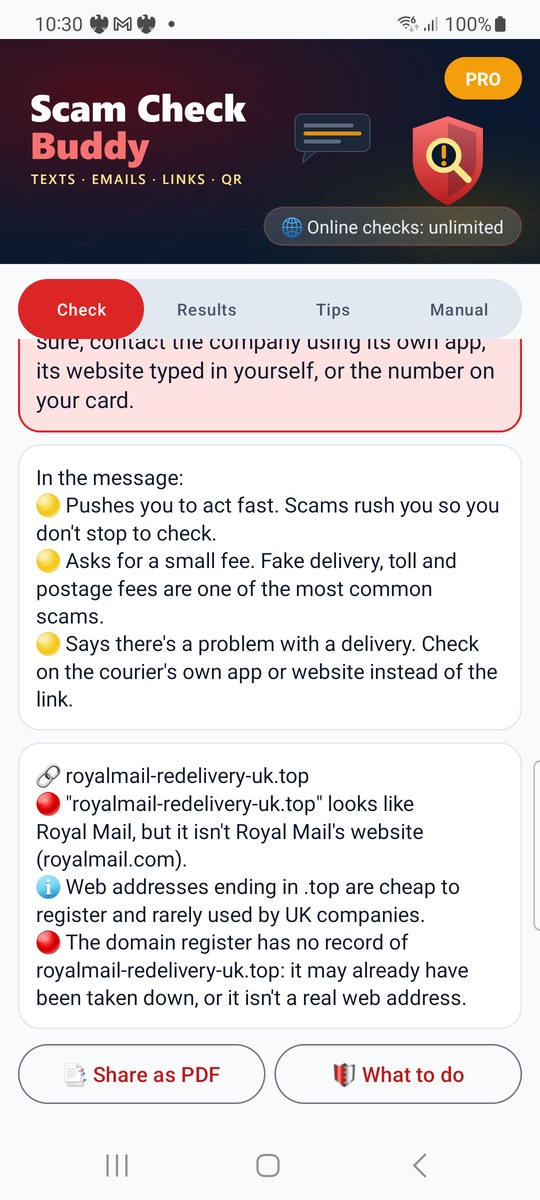
2. Online check
The domain register's answer for the web address.
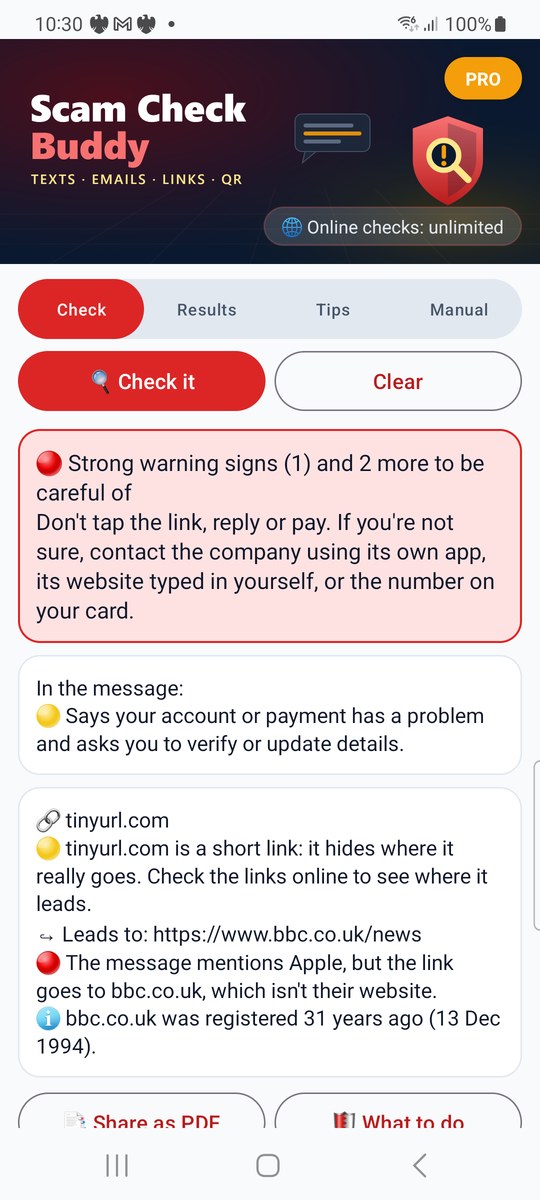
3. Short links
Where a short link leads, without opening the website.
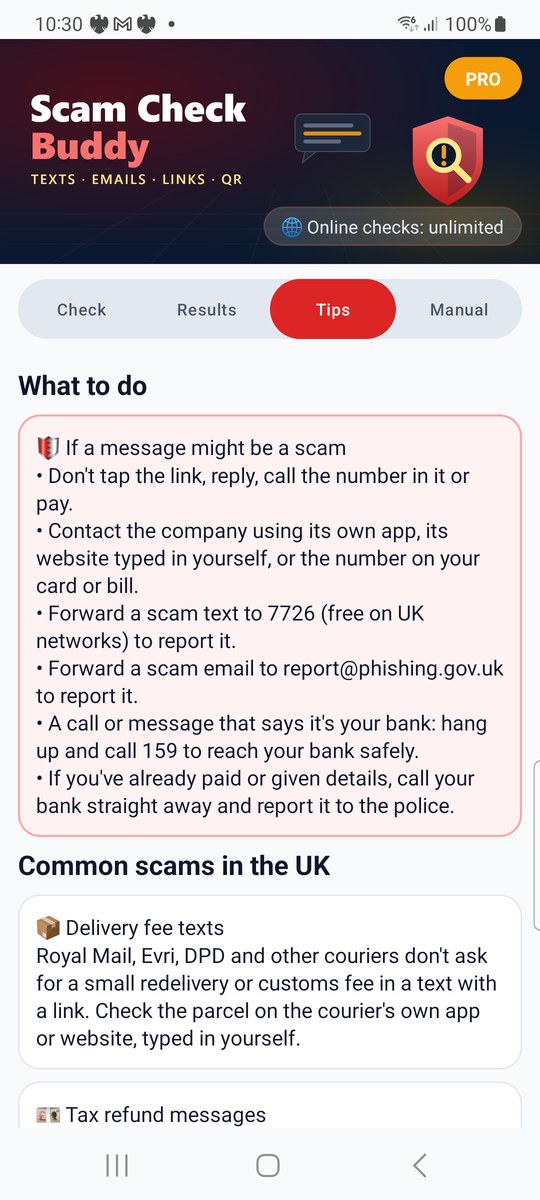
4. Tips
What to do, and the most common UK scams.
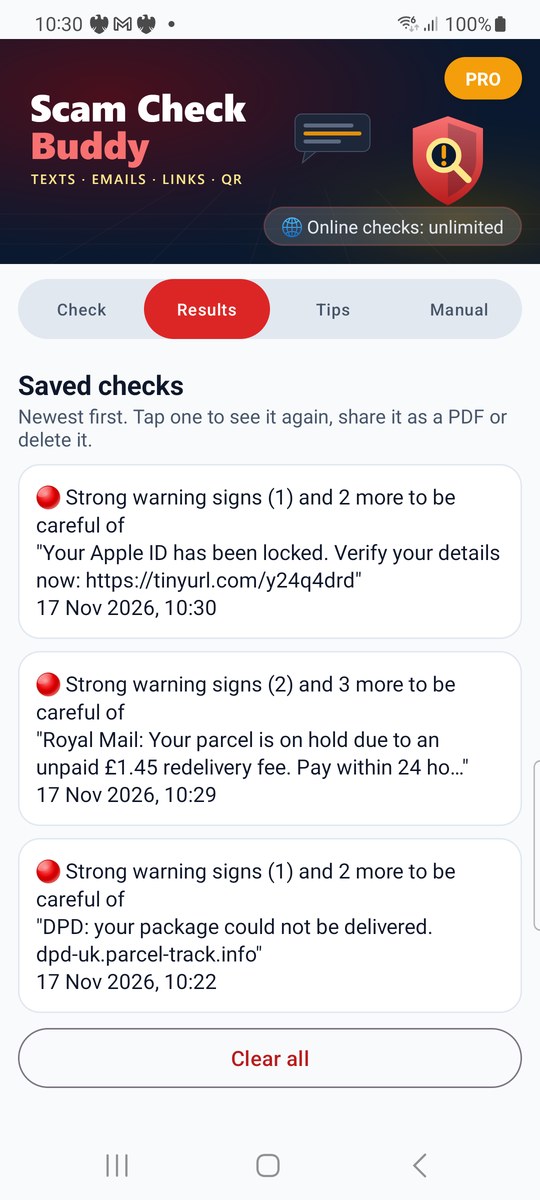
5. Saved checks (Pro)
Every check kept, newest first.
Screenshots: real results on a Samsung Galaxy S20 for example messages typed in for the screenshots.