📖 Wi-Fi Buddy Manual
How Wi-Fi Buddy works, step by step
What Wi-Fi Buddy does
Wi-Fi Buddy shows what your phone measures: the Wi-Fi networks it can hear, the channels they use, and the live signal of the network you're connected to. Every number comes from Android's own Wi-Fi readings.
It can't make your Wi-Fi faster by itself. It helps you see where the signal is weak and which channels are crowded, so you can move your router, change its channel in the router's settings, or pick a better spot.
To keep this manual, tap 📤 Share the manual at the top of the Manual tab: it makes a PDF to save, email or print.
Why it asks for location
Android only gives the list of nearby Wi-Fi networks to apps with precise location permission, and only while Location is switched on. That's Android's rule for every Wi-Fi app.
- The map at the bottom of Networks shows where you are, on this phone only. Wi-Fi Buddy never saves or sends your location.
- If you allow only approximate location, Android gives no scan results: the card at the top explains how to turn on precise location.
- Without the permission, the Signal tab can still show your connection's signal, but Android hides the network's name.
Networks tab
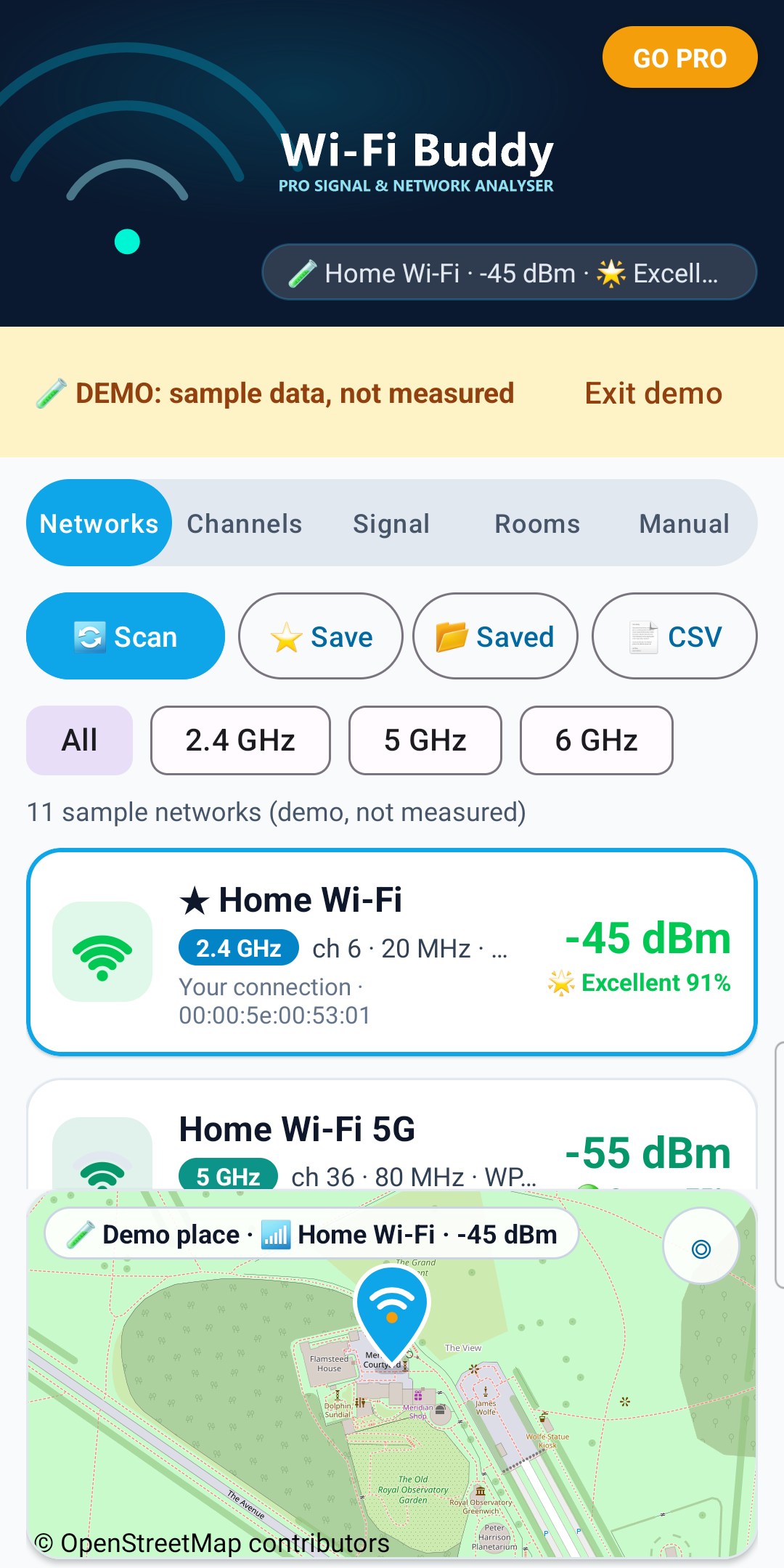
- Every network your phone heard, strongest first, with its signal in dBm, band (2.4, 5 or 6 GHz), channel, channel width, security and Wi-Fi standard (Wi-Fi 4 to 7, on Android 11 and newer).
- ★ marks the network you're connected to.
- Tap a band button to show only that band.
- 🔄 Scan asks Android for a new scan. Android allows an app 4 scans every 2 minutes, so Wi-Fi Buddy also scans by itself every 40 seconds while Networks or Channels is open, and tells you when the next scan is allowed.
- The line above the list says when the results are from. "Heard 1 min ago" means Android hasn't heard that network in the latest scan.
- While the card at the top shows a problem (Wi-Fi off, airplane mode, Location off or no permission), the list is empty: no old results are shown as if they were current.
- ⭐ Share (Pro): the PDF report to save, email or print, or a CSV for a spreadsheet.
- A hidden network shows as "(hidden network)".
- The map at the bottom shows where you are (GPS) with your Wi-Fi network and its signal on the pin. It centres on you once; drag and zoom freely, and tap ◎ to centre on you again. "Waiting for GPS…" means no location fix yet. Map © OpenStreetMap contributors.
- If the map pictures can't download, a message says so over the map (see No map? below).
Signal levels (Coverage score)
dBm is how strong the signal reaches your phone: closer to 0 is stronger. Wi-Fi Buddy rates it with the same Coverage maths as Cell Tower Finder and CellCoverage: Coverage score = (dBm + 100), counted from 0 to 60 as 0 to 100%, kept between 10% and 98%.
- 🌟 Excellent: 90% or more (-46 dBm or better). On the Signal tab it flashes green: you're right next to the router.
- 🟢 Strong: 75 to 89% (-55 to -47 dBm), solid green.
- 🟡 Good: 50 to 74% (-70 to -56 dBm).
- 🔴 Weak: below 50% (weaker than -70 dBm).
When your own signal is red, Wi-Fi Buddy gives the same advice as CellCoverage:
- -71 to -80 dBm: "⚠️ WEAK SIGNAL. A WI-FI EXTENDER / MESH NODE MAY HELP HERE."
- Weaker than -80 dBm (a dead zone): "⚠️ WEAK SIGNAL DEAD-ZONE! FITMENT OF A WI-FI EXTENDER / MESH NODE RECOMMENDED HERE."
Place the extender / mesh node about halfway between your router and the weak spot, where the signal is still Good or better, so it has a strong signal to pass on.
Real speed also depends on the router, interference and how many devices share the network.
Channels tab
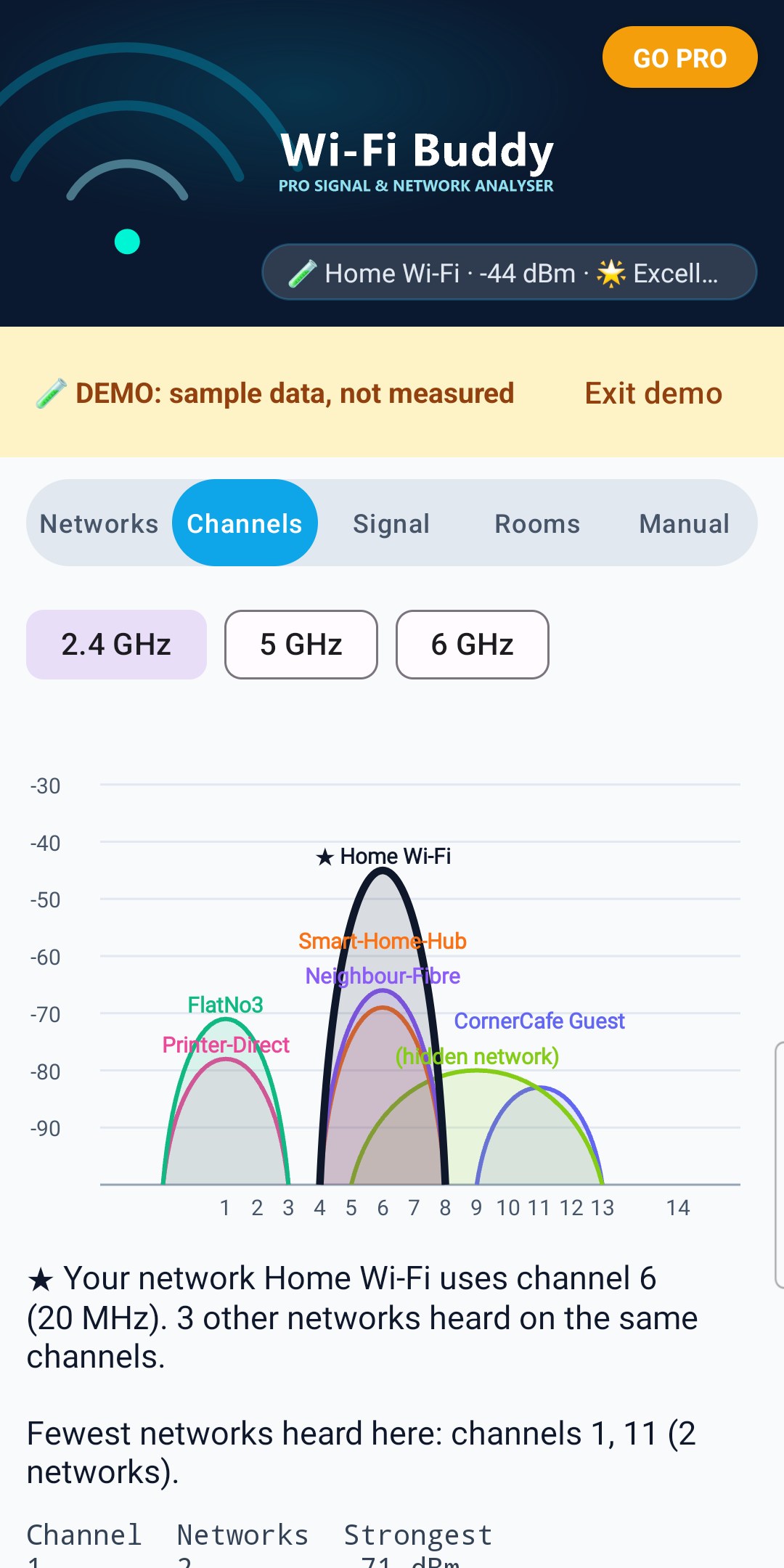
- The graph draws each network as a hill across the channels it uses, as high as its signal. Your network is drawn in dark blue with ★.
- Below the graph: how many other networks use the same channels as yours, and the channel or channels with the fewest networks heard.
- On 2.4 GHz it compares channels 1, 6 and 11, which don't overlap each other. On 5 and 6 GHz it lists the channels in use.
This is only what your phone heard where it is now. Your router may hear different networks, so "fewest networks heard" is a hint, not a guarantee. To change channel, use your router's settings or app.
Signal tab
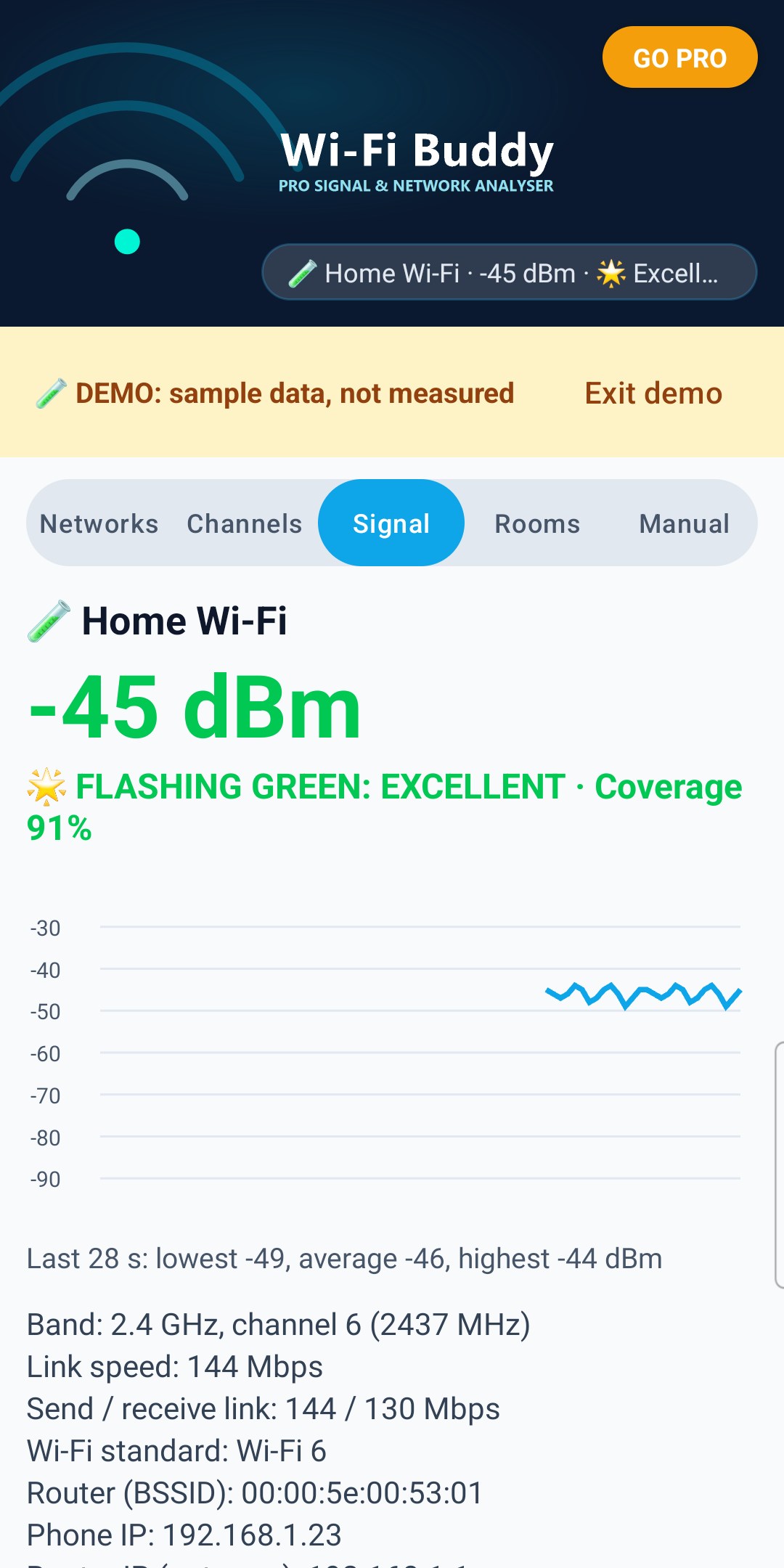
- Your connected network's live signal in dBm, its Coverage score and level (🌟 Excellent flashes green), and a graph of the last 90 seconds.
- When the signal is red, the extender / mesh node advice shows under the level (see Signal levels).
- When Wi-Fi disconnects, the graph starts again: readings from before are not kept.
- Band, channel, link speed (send and receive where Android gives them), Wi-Fi standard, router BSSID, the phone's IP address, the router's IP (gateway) and DNS.
Android updates the signal every few seconds. Link speed is the radio link between phone and router, not your internet speed.
⭐ Rooms tab (Pro)
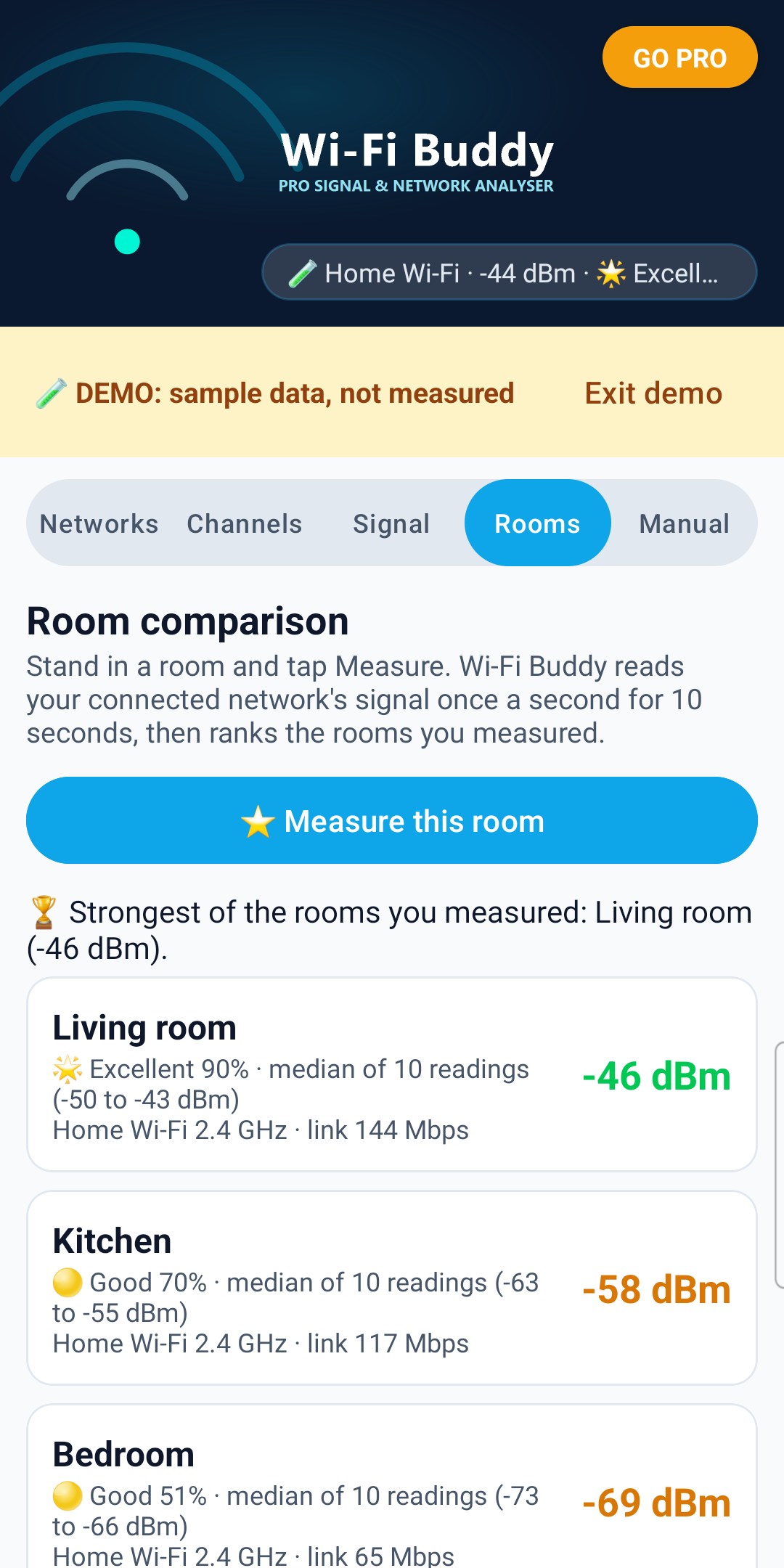
Find the room with the strongest Wi-Fi:
1. Stand where you'd use Wi-Fi and tap 📏 Measure this room.
2. Pick or type a room name and tap Start. Keep still for 10 seconds: Wi-Fi Buddy reads your connected network's signal once a second.
3. Repeat in other rooms.
Rooms are ranked by the median of their 10 readings (the middle value, as CellCoverage's Blueprint), with the Coverage score and level. 🏆 marks the strongest of the rooms you measured. If rooms are within 2 dB of each other, Wi-Fi Buddy says they're too close to call. Measuring a room again with the same name replaces its reading. If rooms were measured on different networks or bands, it says so.
A red room shows the extender / mesh node advice in red, and so does the PDF report.
🧪 Demo
Tap 🧪 Try the demo (Manual tab, or the card at the top when Wi-Fi Buddy can't scan) to see every screen with sample networks, a sample connection and sample rooms. A yellow strip says DEMO: sample data, not measured, and exports made in the demo say DEMO too.
In the demo you can try the Rooms list, 📤 Share, CSV and the PDF report for free. Measuring rooms and saving scans use your real Wi-Fi, so they need the demo switched off. Tap Exit demo to go back to your real Wi-Fi.
Once you've bought Pro, the Manual tab no longer shows 🧪 Try the demo. It's still on the card at the top when Wi-Fi Buddy can't scan.
⭐ Pro
Pro is one payment for life. No subscription.
- Room comparison (Rooms tab)
- ⭐ Save a scan and look at it again later with 📂 Saved (a saved scan can be deleted from its banner)
- CSV export of networks and rooms, for a spreadsheet
- PDF report of your connection, rooms and networks, to save, email or print (📤 Share on Networks, or PDF on Rooms)
Tap GO PRO at the top. Already bought it, or on a new phone with the same Google account? Tap Restore purchase.
Your privacy
- Scans, saved scans and room readings are stored on this phone only. They are not backed up and the app never sends them anywhere.
- Your location is only shown on the map on this phone. Wi-Fi Buddy never saves or sends it.
- The map pictures come from OpenStreetMap over the internet: like any map, their server sees which map area is downloaded, not your Wi-Fi details.
- Your scans, rooms and Wi-Fi details only leave your phone if you tap 📤 Share, CSV or PDF and share the file yourself.
- No account, login or password is needed.
Not seeing networks?
- Is the card at the top asking for something? Follow it: location permission (precise), Location switched on, Wi-Fi switched on.
- Airplane mode switches Wi-Fi off. You can turn Wi-Fi back on while airplane mode stays on.
- Just allowed the permission? Tap 🔄 Scan.
- "Next scan in …s": Android's limit of 4 scans every 2 minutes. The list still shows Android's latest results.
- Some networks only appear in some scans, especially weak ones. Scan again a little later.
No map?
The map pictures come from OpenStreetMap (tile.openstreetmap.org), so they need the internet. If they can't download, the map stays an empty grid and a message says so over it.
- Check your internet connection.
- An ad-blocker, VPN or private DNS can block the map. Allow tile.openstreetmap.org in it, or switch it off for Wi-Fi Buddy.
- The message goes by itself once the map can be reached again (Wi-Fi Buddy checks every 30 seconds).
Everything else in Wi-Fi Buddy works without the map.
About
Wi-Fi Buddy v1.3 (Build 4)
Publisher: AppStack Studio
⚡ WHY WI-FI BUDDY
Wi-Fi Buddy shows what your own phone measures, rated with the same Coverage maths as Cell Tower Finder and CellCoverage, and it tells you plainly what Android does and doesn't allow.
| Feature |
Android's Wi-Fi settings |
Wi-Fi Buddy |
| Signal of every nearby network |
Signal bars only |
Measured dBm, Coverage score and level for each network |
| Which channels are crowded |
Not shown |
Channel graph and "fewest networks heard here" |
| Live signal while you walk round |
Not shown |
Live dBm, 90-second graph, flashing green when Excellent |
| Room-by-room comparison |
Not available |
⭐ Pro: rooms ranked by median signal, with a PDF report |
| What to do about a weak spot |
Not shown |
Extender / mesh node advice when your signal is red, with where to place it |
| Price |
Built in |
Free, Pro is one payment for life (no subscription) |
⚠️ IMPORTANT DISCLAIMER
- Wi-Fi Buddy shows what this phone measured, where it was at the time. Signal levels change as you move, and other devices or your router may hear different networks.
- Wi-Fi Buddy can't make your Wi-Fi faster by itself and can't change your router's settings. "Fewest networks heard" is a hint, not a guarantee.
- Link speed is the radio link between phone and router, not your internet speed.
- Network names shown in the app are broadcast by the networks around you. Wi-Fi Buddy is not affiliated with any router maker or broadband provider.
Screenshots show the app's built-in demo (sample data, not measured), with a sample place on the map.